> For the complete documentation index, see [llms.txt](https://docs.loverp-scripts.de/love-rp-de/llms.txt). Markdown versions of documentation pages are available by appending `.md` to page URLs; this page is available as [Markdown](https://docs.loverp-scripts.de/love-rp-de/emergencydispatch/developer/ambulance-job-integration.md).
# Ambulance Job Integration
## esx\_ambulancejob
Datei: client/main.lua\
\
Suche nach: function SendDistressSignal()\
\
Folgende Zeile in die function einfügen:
```lua
TriggerEvent('emergencydispatch:emergencycall:new', "ambulance", "bewusstlose Person (automatischer Notruf)", false)
```
## qb-ambulancejob
Datei: client/dead.lua\
\
Am Ende der Datei folgendes hinzufügen:
```lua
local dispatchsended = false
Citizen.CreateThread(function()
while true do
Citizen.Wait(0)
if isDead or InLaststand then
if dispatchsended == false then
DrawTxt(0.94, 1.40, 1.0, 1.0, 0.6, "PRESS ~g~E~w~ TO SEND DISPATCH!", 255, 255, 255, 255)
if IsControlPressed(0, 38) then
dispatchsended = true
TriggerEvent('emergencydispatch:emergencycall:new', "ambulance", "bewusstlose Person (automatischer Notruf)", false)
end
else
DrawTxt(0.94, 1.40, 1.0, 1.0, 0.6, "DISPATCH ~g~SENDED~w~!", 255, 255, 255, 255)
end
else
dispatchsended = false
end
end
end)
```
## visn\_are
{% hint style="info" %}
Diese Anleitung gilt für die visn\_are Version 1. In V2 kann in der config.lua von visn\_are EmergencyDispatch als Ziel des Anrufs gewählt werden.
{% endhint %}
Datei: shared/client/aremedical*/*are*\_*medical.lua\
\
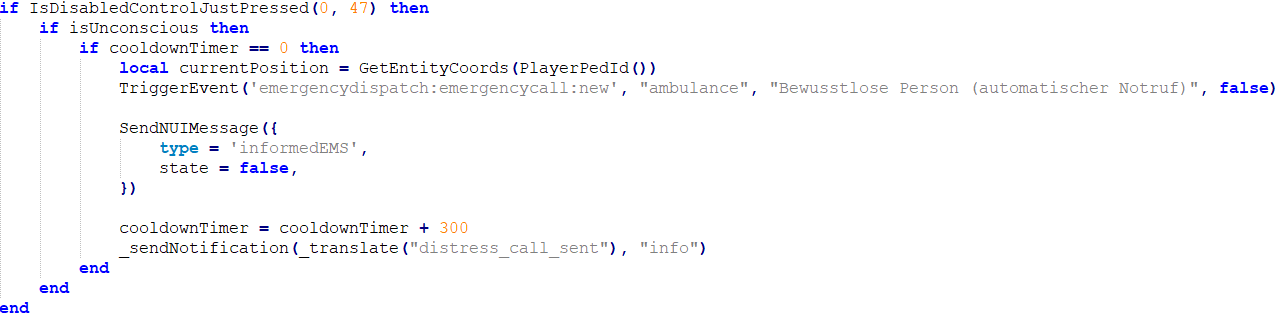
Suche nach: if IsDisabledControlJustPressed(0, 47) then\
\
Folgende Zeile hinzufügen:
```lua
TriggerEvent('emergencydispatch:emergencycall:new', "ambulance", "Bewusstlose Person (automatischer Notruf)", false)
```